Download site for ${MODULE.NAME.PRETTY}
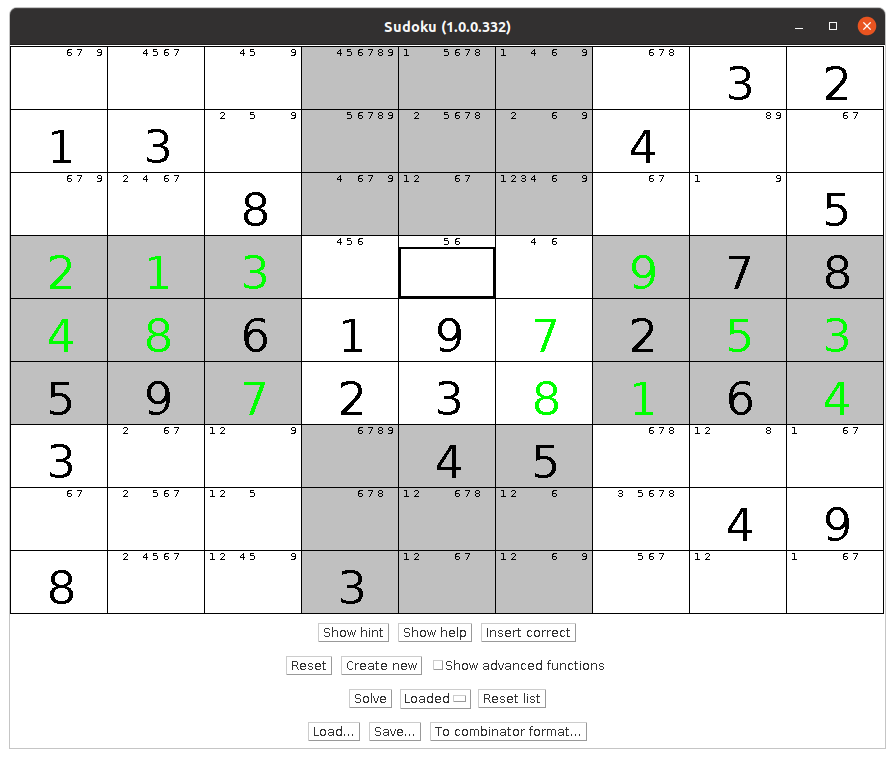
Sudoku solver and generator.
Feature list
- Can generate at least 1,000,000 very different* Sudokus
- Automatic or manual "possible numbers" / "pencil markers"
- Shows whether the entered numbers are correct
- Insert the correct number into the selected cell
- Calculate whether the Sudoku is minimal** or not
- 5 different Sudoku solve algorithms
- Can find the first 1,000 solutions to a Sudoku
- Solve a Sudoku step by step
- Find all Sudokus that are minimal** to a non-minimal** Sudoku
- Undo
- Help / tips
Installation
- Download this file
- Follow the instruction on the general installer page
Uninstallation
- Follow the instruction on the general uninstaller page
The newest version is: ${MODULE.VERSION}
Release notes
Help
- Very much help
- Press the "Create new" button
- Press the "Solve" button
- A lot of help
- Press the "Create new" button
- Insert numbers from "possible numbers"
- If you have problems, you can use the button "Insert correct"
Or try your way until the number turns green
- Medium help
- Press the "Create new" button
- Check the "Show advanced functions" checkbox
- Change "Possible" to "Semi automatic"
- Insert numbers from the "possible numbers" and update the "possible numbers" yourself. Check the numbers if they go red.
- A little help
- Press the "Create new" button
- Check the "Show advanced functions" checkbox
- Change "Possible" to "Manual"
- Insert numbers from the "possible numbers" and update the "possible numbers" yourself.
- No help
- Check the "Show advanced functions" checkbox
- Change "Possible" to "Don't show"
- Press the "Create new" button
- Uncheck "Solve mode"
- Insert numbers
- Fancy
- Press the "Create new" button.
- Check the "Show advanced functions" checkbox
- Press the "Solve 5 (Step)" button.
- Press "Animate".
Details
- "Possible"
- "Automatic": "Possible numbers" above a cell are automatically updated to what numbers are possible / allowed in the cell
- "Semi automatic": "Possible numbers" can / must be updated manually by the user. The color of "Possible numbers" indicates:
- Green: "Possible numbers" are exactly the numbers that are possible.
- Yellow: All "Possible numbers" are possible, but it contains fewer numbers than are possible.
- Red: One or more numbers in "Possible numbers" are not possible.
- "Manual": "Possible numbers" can / must be updated manually by the user. No color indication.
- "Don't show": "Possible numbers" are not shown above the cells.
- "Update possible": Updates the "Possible numbers" to be the possible / allowed numbers in the cell. Can only be used when "Possible" is "Semi automatic" or "Manual"
- "Reset possible": Set all "Possible numbers" to be all numbers. Can only be used when "Possible" is "Semi automatic" or "Manual"
- "Show possible": Shows which numbers are possible / allowed in the current cell.
- "Show hint": Shows a hint about which cell can be filled.
- "Show help": Shows help for which cell can be filled and why.
- "Solve mode": If checked the color of the number indicates:
- Black: The number is from the start / original Sudoku
- Green: The number is correct
- Yellow: The number may be correct (The Sudoku's solution has not been found yet or it has several solutions)
- Red: The number is incorrect.
- Turquoise: The cell has changed compared to the start / original Sudoku
- "Reset": Removes all numbers from the Sudoku.
- "Create new": Create a new random*** Sudoku
- "Create new...": Create a new random*** Sudoku with the option to choose a difficulty level
- "Is minimal": Calculate whether the Sudoku is minimal**
- "Standardize": Swap the numbers in the Sudoku in such a way that the top lines become 1, 2, 3, 4, 5, 6, 7, 8 and 9*****. The function does not require the Sudoku to be completely filled / solved.
- "Number of possible": Show the total number of possible Sudokus
- "Print": Print the current Sudoku
- "Multi print": Print 2 x 4 random*** Sudokus in the 5 difficulty levels
- "Multi print (Easy)": Print 2 x 4 random*** Sudokus in 5 difficulty levels easier than easy
- "All minimal": Find all minimal** Sudokus for this Sudoku. Can take VERY long time!
- "Solve", "Solve 2", "Solve 3", "Solve 4", "Solve 5 (Fastest)" and "Solve 5 (Step)": 5 different ways / algorithms to solve the Sudoku****
- "Benchmark": Will run a benchmark test with different create and solve sudokus steps and show the result in a dialog
Statistics
For 1,000,000 sudokus created.
|
Type
|
Min
|
Max
|
Avg.
|
Total
|
|
Filled
|
20
|
30
|
24.4
|
24,417,285
|
|
Free
|
51
|
61
|
56.6
|
56,582,715
|
|
Rule 1
|
1
|
692
|
13.3
|
13,333,561
|
|
Rule 2
|
0
|
248
|
4
|
4,037,233
|
|
Rule 3
|
0
|
106
|
0.8
|
780,528
|
|
Brute force
|
0
|
383
|
2.8
|
2,784,000
|
|
Loop count
|
1,053
|
3,375,504
|
19,066.3
|
19,066,310,870
|
|
Time (ms)
|
0
|
391
|
1.6
|
1,635,845
|
The difficulty level is based on the distribution of 1,000,000 generated Sudokus with 20% on each difficulty level.
|
Difficulty
|
Loop count from
|
Loop count to
|
Number of Sudokus
|
|
Extremely easy
|
0
|
1,052
|
0
|
|
Very easy
|
1,053
|
5,666
|
199,916
|
|
Easy
|
5,667
|
8,443
|
200,072
|
|
Medium
|
8,444
|
14,696
|
199,994
|
|
Hard
|
14,697
|
26,879
|
200,014
|
|
Very hard
|
26,880
|
3,375,504
|
200,004
|
|
Extremely hard
|
3,375,505
|
...
|
0
|
Notes
- * Very different
- All Sudoku solutions standardized***** are different.
- ** Minimal
- The Sudoku has exactly one solution and if any number are removed, the Sudoku will have more than one solution.
- *** "Create new"'s algorithm
-
- Insert a random number into a cell if allowed.
- Repeat first step 81 times
- Solve the Sudoku
- If it has one or more solutions, the first solution found is used
- Otherwise, a random number is removed and step 3 is repeated
- Remove a random number from the Sudoku
- Calculate whether the Sudoku is minimal**
- If it is not minimal** go to step 4
- A random minimal** Sudoku has now been created
- **** Solve algorithms
-
- "Solve": "Brute force"
- Insert all possible numbers one at a time into the first empty cell and call yourself recursively
- (The algorithm almost everyone uses)
- (I've seen Sudokus it took 12 minutes to solve!)
- "Solve 2": "Solve via logic". (Cannot solve all Sudokus)
- Calculate possible numbers for all cells
- Rule 1: Run through all cells, and if only one number is possible in a cell, insert it
- Rule 2: If a number can only fit in exactly one place in a row, column or quadrant, insert it
- Repeat Rule 1 and Rule 2 until they make no more changes.
- "Solve 3": Use "Solve 2" and then "Solve"
- Use "Solve 2" to solve as much as it can, then use "Solve". (Equal to pressing "Solve 2" and then "Solve")
- "Solve 4": "Solve" and "Solve 2" merged together
- Use "Solve 2" to solve as much as it can, then brute force one number and call yourself recursively
- "Solve 5": Same algorithm as "Solve 4", just reimplemented
- Solve 2 has the problem that it has to calculate all "possible numbers" every time it is called, and it will be called many times!
- This algorithm "stores" the "possible numbers" after they are calculated the first time
- This also added an extra rule. It is a bit difficult to explain, but try to see if http://www.sudokuoftheday.com/pages/techniques-3 .php doesn't make sense
- It can also quickly determine that a Sudoku has no solutions, even if it has few inserted numbers.
For example: (In total, there are only two possible numbers (8 and 9) for the three red cells => No solution)
- ***** Standardized
- The numbers in the Sudoku are swapped so that the top row in the Sudoku's solution becomes 1, 2, 3, 4, 5, 6, 7, 8, 9
See the Sudoku Android project on the Other projects page.
See the Sudoku GWT project on the Other projects page.
See the Sudoku Scratch project on the Other projects page.
Development
My source code
Other dependencies
- Java Runtime Environment (JRE) version: ${MODULE.JRE.VERSION}
See the List of projects page for other projects.
Last Updated: ${HTML_FILE.LAST_MODIFIED}
Copyright Allan Rasmussen©